
Multi-factor authentication (MFA) was supposed to be the answer to stolen passwords. But attackers have found a way around it that doesn’t need a single line of malicious code, they just need your employee to get annoyed and tap “Approve.”
This is an MFA fatigue attack, and it’s become one of the fastest-growing identity-based threats facing Indian enterprises today. From the 2022 Uber breach to repeated incidents against Microsoft 365 tenants, attackers are proving that even strong authentication can be broken through sheer persistence and human psychology, not technical brilliance.
For medium and large enterprises, IT & SaaS companies, BFSI firms, healthcare organizations, and manufacturing businesses in Bangalore and across India, this is not a theoretical risk. It’s an active, growing attack method. This guide explains exactly how MFA fatigue attacks work, why they succeed, and the practical steps your organization can take to stop them.
What Is an MFA Fatigue Attack?
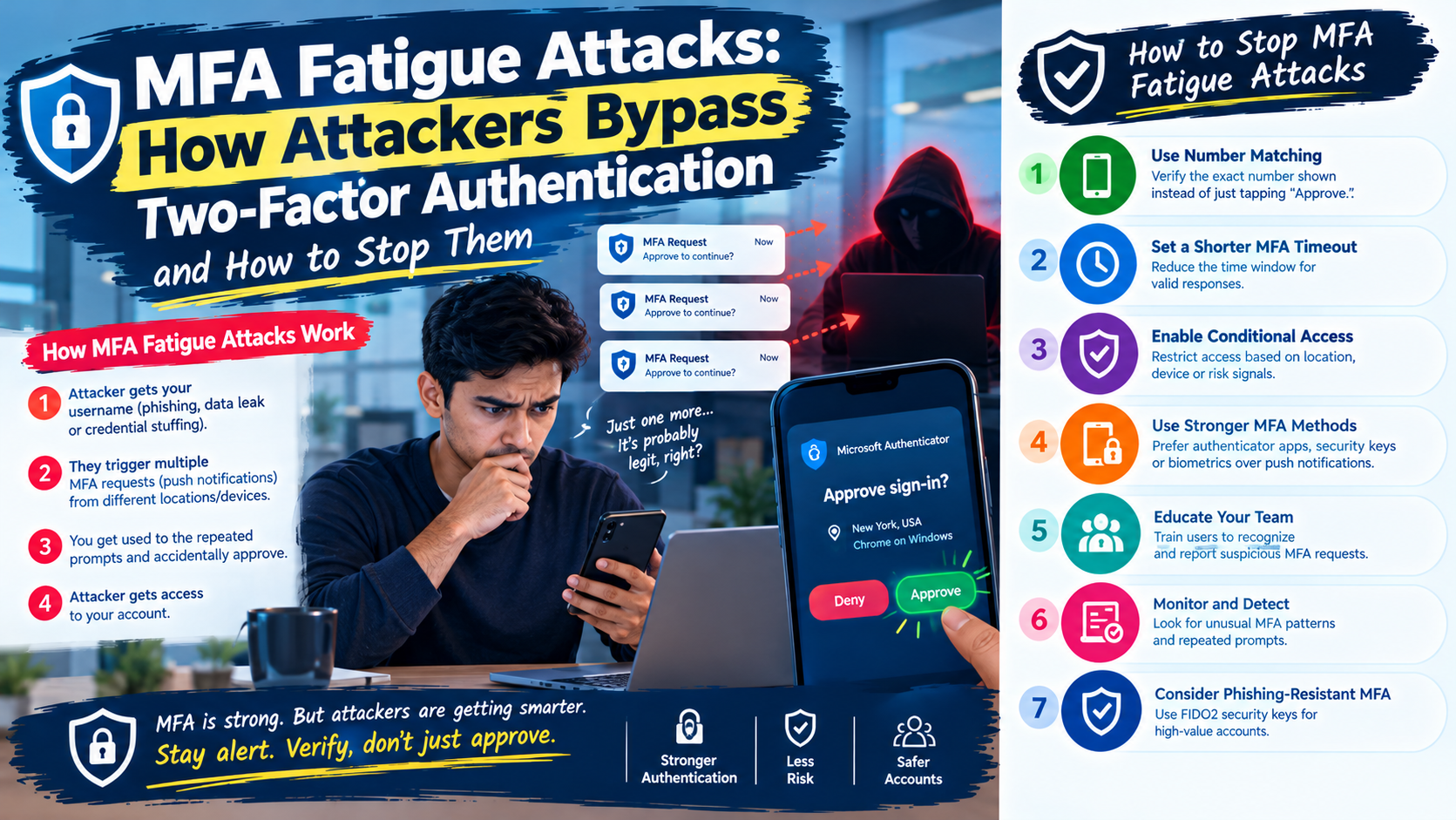
An MFA fatigue attack (also called MFA bombing or push bombing) is a social engineering technique where an attacker who already has a victim’s username and password triggers repeated MFA push notifications, hoping the victim will eventually approve one, either out of confusion, annoyance, or the assumption it’s a system glitch.
Unlike traditional hacking, this attack doesn’t exploit a software vulnerability. It exploits human behavior. The attacker already cleared the first hurdle (the password, usually obtained through phishing, credential stuffing, or a data leak). The push notification is the only thing standing between them and your network.
How MFA Fatigue Attacks Work
Understanding the attack chain helps security teams spot it before damage is done.
- Credential theft: The attacker obtains a valid username and password through phishing, malware, or purchased credentials from the dark web.
- Repeated MFA prompts: Using the stolen credentials, the attacker logs in repeatedly, triggering a flood of push notifications to the victim’s phone — sometimes dozens within minutes.
- Psychological pressure: The victim, confused or irritated by the constant alerts, eventually taps “Approve” just to make the notifications stop.
- Account takeover: The attacker gains access to the account, and from there, to internal systems, email, VPNs, or cloud infrastructure.
MFA Bombing and Push Notification Attacks
Some attackers escalate the pressure further by combining push bombing with a follow-up phone call or message, posing as IT support and asking the employee to “approve the request to fix a login issue.” This blend of automated spam and live social engineering is what made the Uber breach so effective, the attacker contacted the employee directly on a messaging app, pretending to be from corporate IT.
The Social Engineering Angle
MFA fatigue attacks succeed because they target trust and fatigue, not firewalls. Employees are trained to respond quickly to notifications, not to question them. Attackers count on that instinct.
Why Push Notification Fatigue Attacks Work So Well
Security researchers point to a few consistent reasons organizations keep falling for this tactic:
- Notification overload: Employees already receive dozens of app notifications daily; one more MFA prompt doesn’t always raise suspicion.
- Ambiguous approval screens: Many authenticator apps show only a generic “Approve/Deny” button with no context about the login location or device.
- No rate limiting: Many legacy MFA setups don’t cap how many push requests can be sent in a short window.
- Late-night timing: Attackers often launch these attacks outside business hours, when employees are less alert and more likely to approve a prompt just to stop the buzzing.
According to Microsoft’s threat intelligence reporting, identity-based attacks, including MFA fatigue and token theft, have surged as attackers shift away from malware toward exploiting authentication workflows directly. This mirrors a broader trend: cybersecurity threats to MFA are no longer about breaking encryption; they’re about breaking patience.
Real-World Examples of MFA Bypass Attacks
- Uber (2022): An attacker purchased stolen contractor credentials, then bombarded the employee with MFA requests for over an hour before contacting them on WhatsApp, posing as IT support. The employee approved the request, giving the attacker access to internal systems.
- Cisco (2022): Attackers used voice phishing combined with repeated MFA push notifications after compromising an employee’s personal Google account, which contained synced corporate credentials.
- Microsoft 365 tenants (ongoing): Threat actors continue to target Microsoft Authenticator MFA setups using push bombing, particularly against organizations that haven’t enabled number matching.
These cases show that even companies with mature security programs are vulnerable when MFA configuration relies on simple approve/deny prompts.
MFA Bypass Techniques Beyond Fatigue
MFA fatigue is only one way attackers get around two-factor authentication. A complete defense strategy should also account for:
- SIM swapping: Attackers hijack a victim’s phone number to intercept SMS-based codes.
- Session hijacking (pass-the-cookie): Attackers steal active session tokens, bypassing the need to trigger MFA at all.
- Adversary-in-the-middle (AiTM) phishing: Fake login pages relay credentials and MFA codes in real time to the attacker.
- Help desk social engineering: Attackers call IT support pretending to be a locked-out employee and talk their way into an MFA reset.
Understanding how attackers bypass two-factor authentication across all these methods, not just push bombing, is essential for building a resilient identity and access management strategy.
How to Prevent MFA Fatigue Attacks
The good news: MFA fatigue prevention doesn’t require replacing your entire authentication system. It requires tightening how MFA is configured and how employees respond to it.
1. Turn On Number Matching Authentication
Instead of a simple “Approve/Deny” button, number matching requires the user to enter a number shown on the login screen into their authenticator app. This small change eliminates most fatigue attacks because an employee can no longer approve a prompt without actively looking at and confirming login context.
2. Move Toward Phishing-Resistant MFA
Standards-based options like FIDO2 security keys or certificate-based authentication are far harder to bypass than push notifications or SMS codes. For high-risk accounts, admins, finance teams, executives, phishing-resistant MFA should be mandatory, not optional.
3. Set Push Notification Limits and Lockouts
Configure your identity provider to automatically lock an account or flag it for review after a set number of failed or repeated MFA attempts within a short window. This single control blunts most push-bombing campaigns before they succeed.
4. Add Context to Approval Requests
Where possible, enable location, device, and IP information on the MFA prompt itself. An employee is far less likely to approve a login request showing an unfamiliar country or device.
5. Train Employees to Recognize MFA Bombing
Security awareness training should explicitly cover MFA fatigue attacks, not just phishing emails. Employees need to know that unexpected MFA prompts should always be reported, never approved “just to stop the notifications.”
6. Monitor for Anomalous Authentication Patterns
Security Information and Event Management (SIEM) tools should flag unusual patterns: rapid repeated MFA requests, logins from new geographies, or approvals immediately following a string of denials.
7. Move Toward a Zero Trust Model
A zero trust authentication approach assumes no login, even one with a valid MFA approval, is automatically trusted. Continuous verification based on device health, location, and behavior adds another layer that push bombing alone can’t defeat.
Building Enterprise MFA Security Solutions That Actually Hold Up
Unauthorized login attempts prevention isn’t a one-time project, it’s an ongoing discipline that touches identity policy, network monitoring, and employee behavior together. This is where many growing businesses in Bangalore and across India struggle: they adopt MFA, check the compliance box, and assume the risk is handled.
In reality, secure authentication methods need to evolve alongside attacker tactics. That’s why Gigahertz Consultants’ cyber security services are built around a four-stage approach, risk assessment, risk recommendation, risk mitigation, and continuous monitoring, rather than a one-and-done MFA rollout.
For organizations managing sensitive data under India’s data protection law, strong authentication also plays directly into broader compliance obligations. Our guide on DPDPA compliance for IoT and enterprise security breaks down how identity controls like MFA fit into your overall data protection posture, alongside related reading on IoT security risks before DPDPA enforcement and data privacy best practices for Indian businesses.
Why This Matters for Your Industry
- BFSI and healthcare: Regulatory bodies increasingly expect phishing-resistant MFA for systems handling financial or patient data.
- IT, SaaS, and AI/ML companies: Engineering and admin accounts are high-value targets — a single approved push notification can expose source code or production environments.
- Manufacturing and renewable energy: OT and IT convergence means a compromised corporate account can become a pathway into operational systems.
- Universities and research institutions: Large, decentralized user bases make consistent MFA policy enforcement harder — and more necessary.
Gigahertz works with enterprises, SMEs, and specialized sectors to design identity and access management frameworks that account for real-world attacker behavior, not just checkbox compliance.
FAQs
1. What is an MFA fatigue attack?
An MFA fatigue attack is when an attacker with stolen login credentials repeatedly triggers MFA push notifications until the victim approves one, granting account access.
2. How is MFA fatigue different from a normal phishing attack?
Phishing tricks a user into giving up credentials directly. MFA fatigue assumes the attacker already has credentials and instead pressures the user into approving a second-factor prompt.
3. Does number matching stop MFA bombing attacks?
Yes. Number matching requires the user to manually enter a code shown on-screen into their authenticator app, which prevents accidental or fatigue-driven approvals.
4. Is SMS-based two-factor authentication safe from these attacks?
SMS-based MFA is more vulnerable overall, since it can also be bypassed through SIM swapping. Phishing-resistant methods like security keys offer stronger protection.
5. How can a business detect an ongoing MFA fatigue attack?
Look for repeated authentication attempts in a short time span, failed logins followed by a sudden approval, or logins from unfamiliar locations, all detectable through SIEM monitoring.
6. What is the single most effective fix for MFA fatigue attacks?
Enabling number matching combined with rate-limiting login attempts addresses the majority of real-world MFA bombing incidents.
Conclusion
MFA fatigue attacks prove a hard truth: the strongest authentication system is only as secure as the policies and habits surrounding it. A single tired employee tapping “Approve” can undo years of security investment. By enabling number matching, moving toward phishing-resistant MFA, training staff, and monitoring for anomalies, businesses can close this gap before attackers exploit it.
If your organization needs a security partner to assess and strengthen your authentication defenses, get in touch with the Gigahertz team today. Our experts will help you design an MFA and identity security strategy built for how attackers actually operate, not just for compliance checklists.
Contact Us
Office: 080-4128-7587
Email: reachus@gigahertzconsultants.com
716, 1st Floor, 3rd Main, 9th Cross, Doctor Modi Hospital Road, Chord Rd, near Ganesh Temple, 2nd Stage, Bengaluru, Karnataka 560010
Open Maps
Category: SCADA